
Procurement


On this page
The proposal covers everything: modules, integrations, training, warranty. Migration appears as a single line — "data will be transferred".
Halfway through the project it emerges that the legacy database holds five years of records, product names appear in three different spellings, units of measure are mixed, and half the fields are empty.
Whose work is that now? On which side, and who pays for it?
The short answer
Migration accounts for ten to twenty per cent of project scope and belongs as its own line in the proposal. Not the full history migrates — only balances, reference data and open transactions. Cleaning the data usually stays with the client, and that has to be agreed in advance.
What migrates
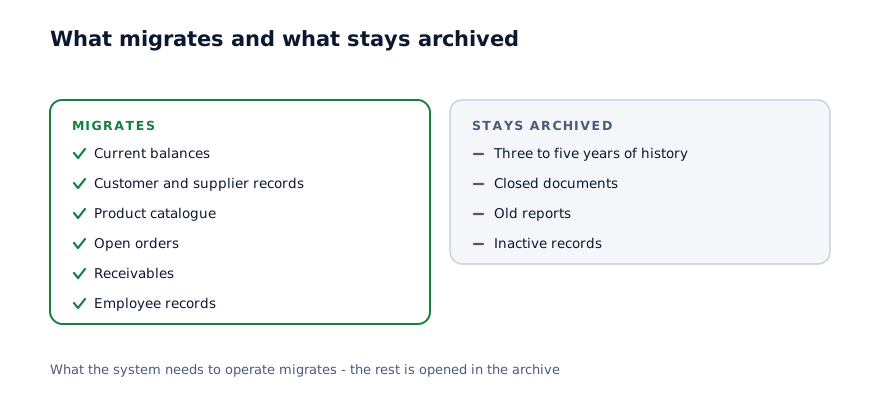
The practical rule: what the system needs to operate migrates, everything else stays in an archive.
| What | Migrates | Why |
|---|---|---|
| Current balances | Yes | Without them the system cannot run |
| Customer and supplier records | Yes | Needed daily |
| Product catalogue | Yes, once cleaned | Every transaction depends on it |
| Open orders | Yes | They are not yet fulfilled |
| Receivables and settlements | Yes | Your financial position |
| Employee records | Yes | For roles and payroll |
| Three to five years of transaction history | Usually not | Stays in the archive |
| Closed documents | No | Opened in the legacy system |
The last two cause the most debate. "We need the full history" is a natural request, but in practice it is rarely used.
The practical answer: the legacy system or files are kept as an archive and opened when needed. Only balances and open transactions go into the new system. That cuts the migration cost several times over.
Cleaning: the longest part
This is the organisational rather than technical part of migration, and it usually stays with the client.
What gets cleaned:
- Duplicate records — one product under two or three names
- Naming conventions — "Cement M400" and "cement m400" are the same thing
- Units of measure — received in tonnes, issued in kilograms
- Empty fields — no code, no price, no category
- Inactive records — products not sold in five years
- Bad contacts — old numbers and dead email addresses
A system cannot do this work, because only you know which two records mean the same product.
Scale: a catalogue of 500 lines usually takes two or three days. Five thousand lines takes two weeks.
The most common mistake
Migrating without cleaning. "We will fix it later" always costs more: once messy data is inside the system, correcting it is three times harder, because transactions are already attached to it.
Why a trial migration matters
This stage is often skipped, and it prevents more problems than any other.
A trial migration moves one month of data, or one department's data, and checks the result. It runs at the start of the project.
What it establishes:
Data quality. How many records are problematic and how long cleaning will take.
Technical compatibility. How data leaves the legacy system — is there an API, does the export work, is the format readable.
Volume. Record counts are often larger than expected.
Relationships. How product codes, counterparties and documents link to each other.
After that, the migration timeline and cost become a calculation rather than an assumption.
How the result is verified
Once the transfer is done the result has to be confirmed. Four checks are enough:
| Check | What is compared |
|---|---|
| Counts | Record numbers in the old system against the new |
| Totals | Total stock value, total receivables |
| Sample | Twenty to thirty random records checked by hand |
| Edge cases | Largest, smallest, negative balances, empty fields |
The last finds the most errors. A negative balance or a zero-priced product usually exposes a problem that existed in the legacy system.
The migration sequence
01
Inventory
What data exists and where: files, databases, paper records. The list is usually longer than expected.
02
Trial migration
One month or one department is moved and checked. Volume and quality become known.
03
Cleaning
Duplicates merged, units standardised, empty fields filled. This sits with the client.
04
Main transfer
Balances, reference data and open transactions. A date is set — usually the start of a month.
05
Verification and sign-off
The four checks are run. Any discrepancy is traced to its cause and corrected.
The date in step four matters. A migration mid-month splits monthly reporting across two systems. The start of a month or quarter is far easier.
Who pays, and how much
This is settled at proposal stage, not mid-project.
| Task | Who normally does it |
|---|---|
| Extracting from the legacy system | The vendor, sometimes the legacy vendor |
| Cleaning the data | The client |
| Formatting and loading | The vendor |
| Verifying the result | Jointly |
| Fixing errors | Depends on the cause |
The second row matters most. Cleaning stays with the client, because only they know which data is correct. Fail to say so up front and the project stalls exactly there.
Cost: migration is typically ten to twenty per cent of project scope. Clean data lands at ten; messy data at twenty or more.
Questions to ask a vendor
- Does migration appear as its own line, and how many hours is it estimated at
- Is a trial migration included and when does it run
- Which side is responsible for cleaning the data
- What migrates and what stays archived — is there a list
- How is data extracted from the legacy system — API, export or database
- How is the result verified and who signs it off
The third question matters most, and it usually goes unanswered.
What happens to the legacy system
After migration the old system is not switched off immediately.
The practical approach: it stays available for at least three months in read-only mode. Someone will need an old document, and in that time everyone becomes confident the new system works.
After three months the data is kept as an archive copy — a file or a database backup. Licence payments stop.
One thing to record: where the archive copy is kept and who can open it. Two years later, when that data is needed, the person who knows how to retrieve it may no longer be there.
In summary
Migration is not a technical task. It is a decision about data quality — and it belongs as its own line in the proposal.
Practical steps:
- Insist that migration appears as a separate line in the proposal
- Put a trial migration into the first month of the project
- Draw up the list in advance: what migrates and what stays archived
- Agree in writing which side does the cleaning
- Set the transfer date at the start of a month or quarter
- Keep the legacy system read-only for three months
Let us look at your data
In 30 minutes we establish where your data sits and in what condition, and give you a scale for the migration.
Discuss your project
Shahbozbek Usmonov
ShahNur Software team sharing lessons from building and running real products.
About the teamRelated articles

ERP
From spreadsheets to an ERP: when it is time to move
When spreadsheets are enough and when they start costing you. Seven signs, the intermediate options, and a practical order for the move.
September 16, 20267 min read
Read more
ERP
Moving from accounting software to an ERP
Whether to replace your accounting system or run it alongside an ERP. What each system is for, how migration runs, and the mistakes that cost the most.
August 28, 20266 min read
Read more
Procurement
Why a six-month project becomes an eighteen-month one
Five sources of overrun and how many weeks each one adds. Practical ways to hold a deadline and the warning signs visible before you start.
September 11, 20267 min read
Read moreHave a product idea? Let’s build it together.
Start a conversationOn this page