
ERP


On this page
The question sounds almost the same in every company: "we already have accounting software, why would we need an ERP?"
The confusion sits in the question itself. Accounting software is a financial system; an ERP is an operational one. They do different work and do not replace each other.
This article separates their jobs and shows how the transition actually runs.
The short answer
In most cases the accounting system is not replaced. It stays for statutory reporting and connects to the ERP through integration. The ERP runs operations: inventory, production, sales, payroll. Full replacement only makes sense when accounting software is being used as an operational system and can no longer keep up with the process.
Two systems, two jobs
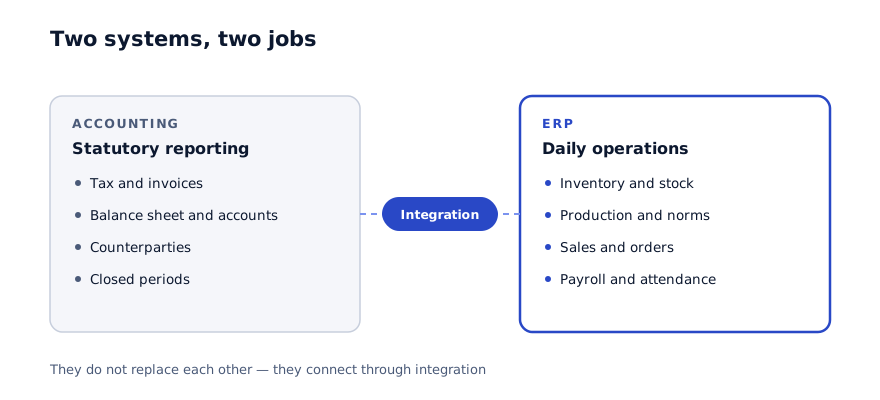
Accounting software produces statutory reporting: tax, invoices, the balance sheet, financial statements. Its audience is the tax authority and the board. It works on periods that have closed.
An ERP runs daily operations: an order is taken, goods arrive at the warehouse, a production order is issued, a worker starts a shift. Its audience is your own staff. It works on the present moment.
The problem starts here: many companies try to use accounting software as an operational system. It can be done, but it is slow and awkward, because the software was built for a different job.
When it is time to move
- The warehouse team does not use the system — they write in a book and accounting enters it later
- Stock figures only update once the accountant has posted the data
- The production process is not represented in any system at all
- Sales staff check stock levels by phone
- Payroll depends on output but is calculated by hand
- Reporting only appears once the month is closed
Three of these mean you need an ERP. It does not mean the accounting software is poor — it means your operations live in notebooks and spreadsheets rather than in a system.
Three scenarios
There are three routes in practice, with different consequences.
1. Accounting stays, an ERP is added. The most common outcome. The ERP runs operations, data flows into accounting at the end of the day, and the finance team carries on as before. Operational staff never open the accounting system.
2. Accounting software is fully replaced. Only sensible when it is being used as an operational system and finance is outsourced. Rare, and the risk is higher.
3. Accounting software is extended. Additional modules are written on top of it. It looks cheaper, but every new requirement means new development, and over time the cost mounts.
For most companies the right answer is the first.
How the integration works
This is the part that raises the most questions.
Data moves in both directions. From the ERP to accounting: sales documents, stock movements, payroll figures. From accounting to the ERP: counterparties, invoice status, payments.
The exchange can run at end of day or in real time. In most cases a daily exchange is enough — it is simpler and cheaper.
| What moves | Direction | Frequency |
|---|---|---|
| Sales documents | ERP → accounting | daily |
| Stock movements | ERP → accounting | daily |
| Payroll figures | ERP → accounting | monthly |
| Counterparty records | both directions | real time |
| Payment status | accounting → ERP | daily |
Integration usually takes two to three weeks and should appear as its own line in the project price.
The most common mistake
Leaving integration until the end of the project. The system gets built, and only then does someone say "now let us connect accounting". In reality integration requirements shape the data structure — product codes, for instance, have to match across both systems. Miss that at the start and the work has to be redone.
How migration runs
01
Data audit
What moves and what stays. Usually only balances, counterparties and the product catalogue move — not the full history.
02
Code alignment
Product codes, classifications and units of measure must match in both systems. This is the most time-consuming step.
03
Trial migration
One month of data is moved and checked, so volume and quality are known before the real run.
04
Parallel running
Both systems run together for a month. It is extra load, but it surfaces errors before the full cutover.
05
Full cutover
Operations move to the ERP, accounting stays where it is, and data exchanges automatically.
What you gain
Stock in real time. Warehouse staff enter data directly and the accounting bottleneck disappears.
Process control. Production order, standard consumption and actual consumption — the variance becomes visible.
A role system. Each employee sees only their own work. In accounting software this is awkward to configure, and often everyone sees everything.
Mobile access. Warehouse and sales staff work from a phone.
Product costing. Real figures tied to production data, rather than a monthly estimate.
What you lose
Few articles cover this section, but it is worth knowing.
Two systems for a period. During parallel running staff enter data twice. It lasts a month and it is tiring.
Finance team habits. A routine built over years changes. Accounting is usually the department that resists most.
Dependence on the integration. Two systems now have to talk to each other. When they do not, that is a problem — which is why monitoring and an SLA matter.
Upfront cost. Migration and integration account for twenty to thirty per cent of project scope.
What it costs
$7,000-12,000On a ready system, integration included, 3-4 weeks
$70,000-90,000Enterprise scale, 6-10 modules, 14-16 weeks
Integration typically takes a separate two to three weeks and should be inside the quoted price. Ask about it directly when you receive a proposal.
In summary
The question is not whether to replace your accounting system. It is where your operations are run.
Practical steps:
- Write down where things sit today: inventory, production, payroll
- If half of them live in notebooks or spreadsheets, you need an ERP
- Do not replace accounting — keep it and connect it through integration
- Migrate balances and reference data, not the entire history
- Plan for a month of parallel running
Let us review the systems you run today
In 30 minutes we establish what is run where and explain how the transition would work, with an indicative timeline and budget.
Discuss your project
Shahbozbek Usmonov
ShahNur Software team sharing lessons from building and running real products.
About the teamRelated articles

ERP
How much does an ERP cost in the GCC
What drives ERP pricing, which ranges are realistic, and what to do when the budget does not stretch. A concrete breakdown by modules, integrations and.
August 25, 20266 min read
Read more
ERP
Off-the-shelf ERP or custom build: which one fits you
Configure a ready system or build from scratch — which is cheaper and safer. The single question that decides it, and what each choice costs you.
August 26, 20265 min read
Read more
ERP
12 questions to ask before choosing an ERP vendor
The questions to put to every vendor. They prevent scope creep, budget overruns and the outcome where a system is delivered but never actually used.
August 27, 20266 min read
Read moreHave a product idea? Let’s build it together.
Start a conversationOn this page