
ERP


On this page
Almost every company starts with spreadsheets, and that is the right decision.
They are fast, cheap, familiar to everyone and require no implementation at all. In a small company they work well, and rushing to replace them is money spent for nothing.
The difficulty lies elsewhere: the moment spreadsheets start costing you is hard to spot. They do not break suddenly — they become expensive gradually.
The short answer
Spreadsheets hold up to roughly twenty or thirty people working in one place. Problems begin when two things arrive: several people working at once, and a need for history. If three of the seven signs apply, it is time to move. On a ready system this takes three to four weeks and $7,000–12,000.
When spreadsheets are enough
Software companies rarely write this section, because it works against sales. But it saves money.
Spreadsheets work well when:
- One person maintains them, or only one edits at a time
- Headcount is under twenty
- The catalogue holds fewer than a hundred lines
- History is not needed — only the current state matters
- The process is still forming and changes often
The last point matters. If the business model changes every month, fixing it into a system is premature. At that stage a spreadsheet is flexible, and it is the right choice.
Seven signs it is time
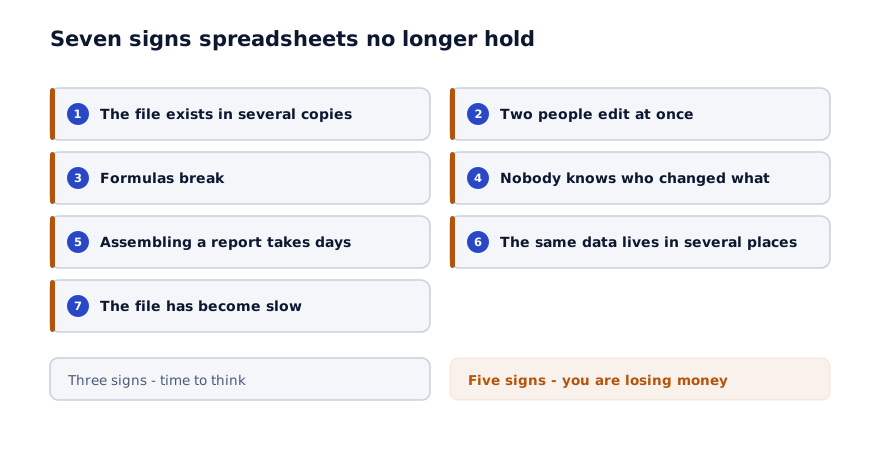
1. The file exists in several copies. "Stock_new_2.xlsx", "Stock_final_latest.xlsx". Nobody knows for certain which one is correct.
2. Two people edit at once. One person's changes disappear with the other's. Cloud versions solve this partly, but stock figures still come out wrong.
3. Formulas break. Someone deleted a row and three calculations started producing wrong numbers. It can take months to notice.
4. Nobody knows who changed what. A figure changed, but who altered it and why is unknown.
5. Assembling a report takes days. Every month data is pulled together from several files.
6. The same data lives in several places. Customer details sit in the sales file and in accounting, and they do not agree.
7. The file has become slow. Tens of thousands of rows have accumulated and opening it takes minutes.
Three of these mean it is time to think about moving. Five mean you are already losing money.
What spreadsheets cost
They look free, because the cost is not in expenditure but in losses.
| Loss | How to calculate it |
|---|---|
| Time assembling reports | Hours per month × hourly cost |
| Fixing errors | How many hours each one takes |
| Double entry | How many places the same data is typed |
| Wrong decisions | A decision made on an outdated figure |
| Data loss | Someone leaves and the file leaves with them |
A worked example: twenty hours a month assembling reports at $4 an hour is $80 a month, or $960 a year. Errors and lost time come on top.
In a company of fifty, the figure usually lands between $3,000 and $8,000 a year. That is a fraction of an ERP's price — but it repeats every year.
A practical test: for one month, count the hours spent assembling reports and correcting errors. Multiply by an hourly cost. The number is usually larger than expected, and it makes the decision considerably easier.
Intermediate options
Moving straight to an ERP is not compulsory. There are two intermediate options and sometimes they are enough.
A cloud spreadsheet. This solves simultaneous editing and adds a change history. But formulas still break and the permission model is limited.
A single module. Inventory only, or CRM only. It is not an ERP, but it closes the biggest pain point and costs less.
When an intermediate option is enough: if the problem sits in one process only. If it spans three or four, separate tools do not talk to each other and you end up with the same problem again.
How the move runs
01
Count the files
Which process lives in which file. This list is usually longer than expected.
02
Clean the data
Duplicates, inconsistent names, empty fields. This is work before the system and it stays on your side.
03
Pick the two most painful
Do not move everything at once. Usually inventory and sales; in manufacturing, inventory and production.
04
Migrate and run in parallel
One month alongside the spreadsheet. Discrepancies are found and corrected.
05
Close the spreadsheet
In month three the file goes to the archive. Otherwise two systems run for years.
The second step takes the longest and is skipped most often. Put messy data into a system and you get a digitised version of the mess.
What migrates and what stays
Answering this saves a great deal of time.
| What | Does it migrate |
|---|---|
| Current balances | Yes, essential |
| Customer and supplier records | Yes |
| Product catalogue | Yes, once cleaned |
| Open orders and receivables | Yes |
| Three years of transaction history | Usually not |
The last one causes the most debate. Migrating full history is expensive and rarely needed. The practical answer: old files stay in an archive and are opened if required. Only balances and open transactions go into the system.
The most common mistake
Trying to migrate every file at once. That produces two outcomes: the project stretches, and staff cannot absorb that much change at once. Start with two processes, confirm they work, then add the next.
Working with staff
Resistance is stronger here than on most projects, for a simple reason: everybody knows spreadsheets.
The new system feels slower at first, and that is true — in the first week every action takes longer. Say so in advance.
What works:
Show a first result quickly. Within a week something should be working — stock visible on screen, for instance. That builds confidence.
Keep the export to spreadsheet. If people can pull data out into a familiar format, they relax. It is a temporary bridge and it lowers resistance noticeably.
Consider who will actually use it. The interface has to suit the storekeeper as well as the accountant.
In summary
Spreadsheets are not a bad tool. They simply stop working once several people and a need for history arrive.
Practical steps:
- Check the seven signs — three matches mean it is time to think
- Convert the time spent on reports and corrections into money
- If the problem is in one process only, consider an intermediate option
- Clean the data; that is work before the system
- Start with two processes rather than everything at once
- Archive the spreadsheet in month three
Let us look at your files
In 30 minutes we tell you which process is worth starting with, and you leave with an indicative timeline and budget.
Discuss your project
Shahbozbek Usmonov
ShahNur Software team sharing lessons from building and running real products.
About the teamRelated articles

ERP
How much does an ERP cost in the GCC
What drives ERP pricing, which ranges are realistic, and what to do when the budget does not stretch. A concrete breakdown by modules, integrations and.
August 25, 20266 min read
Read more
Automation
Warehouse automation: from the ledger to real time
Why stock figures never match, whether barcodes are actually needed, and how a rollout runs. A practical way to reduce your stocktake variance.
September 2, 20266 min read
Read more
ERP
Moving from accounting software to an ERP
Whether to replace your accounting system or run it alongside an ERP. What each system is for, how migration runs, and the mistakes that cost the most.
August 28, 20266 min read
Read moreHave a product idea? Let’s build it together.
Start a conversationOn this page