
Automation


On this page
In many companies attendance tracking begins with a timesheet and ends with one.
A department head fills it in at month end, some days have to be recalled, and lateness is not recorded at all. The accountant then calculates payroll from that sheet, and the objections begin.
The problem is not the calculation. It is that the data was never captured.
The short answer
There are three methods: cards are cheap but unreliable, fingerprints are reliable but awkward on a shop floor, and face recognition is contactless and unaffected by gloves. In manufacturing and services the third is usually the most practical. A system including a terminal runs $7,000–12,000 over three to four weeks.
Comparing the three methods
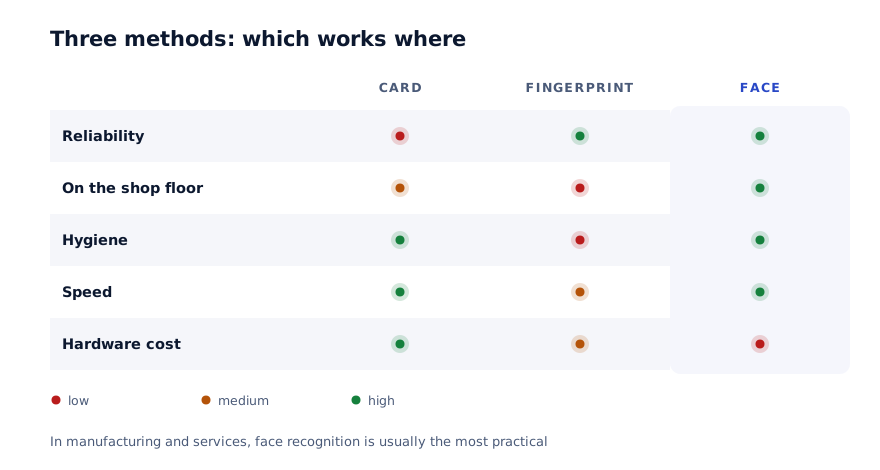
| Criterion | Card | Fingerprint | Face recognition |
|---|---|---|---|
| Reliability | Low — can be passed on | High | High |
| On the shop floor | Works | Dirty hands or gloves are a problem | No problem |
| Speed | Fast | Moderate | Fast |
| Hygiene | No issue | Requires contact | Contactless |
| Hardware cost | Lowest | Moderate | Higher |
| Risk of loss | Cards get lost | None | None |
Cards suit a small office, but in a plant they lose their meaning — passing a card to a colleague is easy and the habit spreads quickly.
Fingerprints are reliable but do not work in shop floor conditions. Hands are oily, dusty or gloved. In food production, hygiene requirements add a further obstacle.
Face recognition is therefore the practical answer in manufacturing and services. Our own Face ID System works this way and is used by over 20,000 people.
More than arrivals and departures
Many companies see attendance tracking as an answer to "who arrived when". In practice it closes four other problems.
Payroll. Hours are calculated automatically and the timesheet disappears. That saves finance two to three days a month.
Overtime. When an employee says they worked Saturday, there is now a record confirming it. That works in the employee's favour — a verbal claim could previously be dismissed.
Access control. Who can enter which area. Warehouse, cash office, server room — each with its own permission.
Safety. In an emergency it is known exactly who is in the building. Many companies never consider this, and it is a serious matter.
Linking to payroll
The real benefit appears when the system does not stand alone.
The link works like this: the terminal records arrival and departure, the system calculates working hours, and the payroll module produces the figure from them.
The rules are defined in advance:
- Start and end times of the working day
- From what point lateness counts — ten minutes, for example
- Whether the lunch break is deducted from hours
- How overtime is approved and how it is paid
- How sickness and leave are recorded
Without these rules the system produces numbers, but how to apply them becomes a monthly argument.
The most common mistake
Switching the system on and applying deductions in the first month. Lateness becomes visible and immediately affects pay — resistance starts the same day. In the first month let data accumulate without consequence. That gives people time to adjust and it saves the system.
Working with staff
This matters more than the technical side. Of all systems, attendance tracking provokes the most resistance.
The reason is plain: lateness is now visible.
What works:
Announce the rules in advance. At least two weeks before switch-on. How lateness is counted, where the threshold sits and what happens in the first month — say it openly.
Show the upside. Overtime is now confirmed by a record. No timesheet to fill in. Employees can see their own hours.
Release the portal early. When employees can see their own data, the system reads as transparency rather than surveillance. Objections fall after that point.
Management uses it too. If a director stays outside the system, staff notice immediately and treat the rule as unserious.
Data privacy
Face recognition works with biometric data, which requires separate attention.
Practical requirements:
| Requirement | What it means |
|---|---|
| Employee consent | Written consent before the system goes live |
| Storage location | Data on your server or an agreed location |
| Access rights | Who can view it — limited by the role system |
| Retention period | How long it is held and when it is deleted |
| Leavers | What happens to a departing employee's data |
These requirements are set in law and can change. Confirm the current position with your lawyer before implementing.
How the rollout runs
01
Write the rules
Working hours, lateness threshold, overtime approval. This is management work and it happens before the system.
02
Terminal placement
Choose the entry point. The number of terminals is calculated by headcount so that no queue forms.
03
Enrol the staff
Each employee is registered. With face recognition this takes a few minutes per person.
04
Trial month
Data is collected and reconciled against the timesheet, but does not affect pay.
05
Link to payroll
Hours flow into the calculation automatically. Timesheets stop.
The second step is skipped most often. If two hundred people pass through one terminal, a queue forms every morning and it breeds resentment. One terminal per sixty to eighty people works in practice.
What to measure
Record at the start of the project and measure again after three months:
| Metric | Why it matters |
|---|---|
| Days spent on payroll | Usually falls from two or three days to a few hours |
| Objections per month | A measure of trust |
| Average lateness in minutes | Usually drops noticeably in the first month |
| Time spent filling timesheets | Time taken from department heads |
The third is interesting: lateness usually falls as soon as the system is switched on, even with no deductions applied. Visibility alone has an effect.
What it costs
$7,000-12,000On a ready system, with payroll linked, 3-4 weeks
Terminal hardware is a separate cost and is not in the price. Face recognition terminal pricing varies by model — ask about it separately when you receive a proposal.
If you already run an ERP, the attendance module is added inside it, which costs less.
In summary
An attendance system is not for recording arrivals and departures. It is for automating payroll and closing disputes.
Practical steps:
- Choose the method by conditions — fingerprints do not work on a shop floor
- Write the rules before the system; that is management work
- Size terminal numbers by headcount so queues do not form
- Apply no deductions in the first month
- Give employees their portal early
- Confirm biometric data requirements with your lawyer
Let us review your attendance process
In 30 minutes we tell you which method suits your conditions, and you leave with an indicative timeline and budget.
Discuss your project
Shahbozbek Usmonov
ShahNur Software team sharing lessons from building and running real products.
About the teamRelated articles

Automation
Payroll automation: from three days to two hours
Why payroll takes so long and where the errors come from. Linking attendance, defining bonus rules and a practical order for the rollout.
September 8, 20267 min read
Read more
Automation
Why systems go unused, and how to prevent it
Systems fail through non-adoption, not technology. Five real causes and what to do before the project, during it and after go-live.
September 10, 20268 min read
Read more
Automation
Warehouse automation: from the ledger to real time
Why stock figures never match, whether barcodes are actually needed, and how a rollout runs. A practical way to reduce your stocktake variance.
September 2, 20266 min read
Read moreHave a product idea? Let’s build it together.
Start a conversationOn this page