
Automation


On this page
The system is delivered. Technically everything works — the server is fine, nothing errors, the reports look good.
Three months later you walk onto the floor and find the storekeeper still writing in a book. Sales still phone to check stock. Accounting still enters everything by hand at month end.
The system exists. Nobody uses it.
This is the most expensive and most common outcome, and it almost never has a technical cause.
The short answer
Systems fail not because they break but because nobody uses them. There are five causes and none of them is technical: the employee sees no benefit, fears the visibility, was never involved, the system has no owner, and the old way was left open. The remedy is not technical either — it starts before the project and continues after go-live.
Five real causes
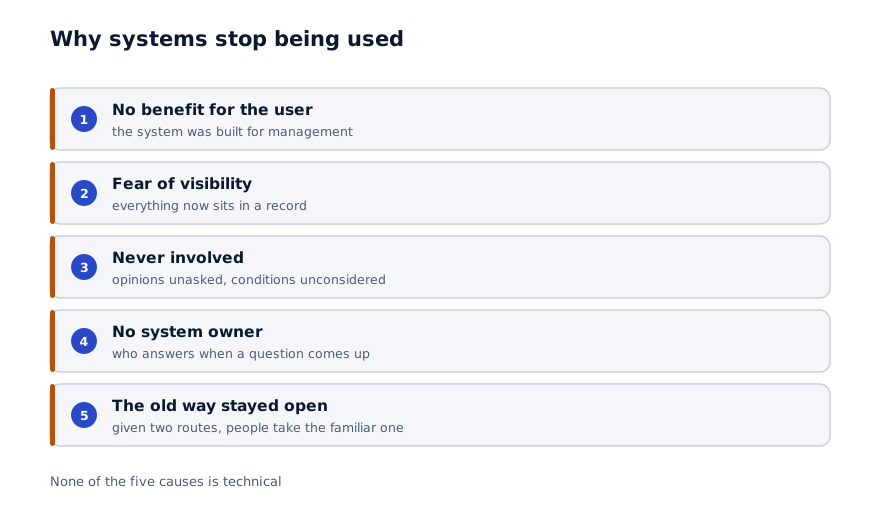
1. No benefit for the person using it
The system is built for management: reports, control, metrics. For the storekeeper it is extra work — now they enter data in the book and on a screen.
If a system does not make an employee's job easier, it will not be used. That is not sabotage, it is logic.
2. Fear of visibility
The least discussed cause. Five minutes of lateness used to pass unnoticed, only the storekeeper knew the real stock figure, and nobody checked what discount a salesperson gave.
Now everything sits in a record. People are not afraid of the system; they are afraid of transparency.
3. Never involved in the process
The system arrives from above. One day an employee sees a new screen and is told to work in it.
Nobody asked their opinion, and the real working conditions were not considered. The result is an interface that suits an office and not a shop floor.
4. The system has no owner
The project ends and the team leaves. A question comes up — who answers it? A new employee joins — who trains them? A process changes — who updates the system?
A system without an owner quietly ages, and within a year it is abandoned.
5. The old way was left open
The book is still on the desk. The spreadsheet still works. Orders still arrive in the messaging group.
Given two routes, people take the familiar one. That is natural.
Three phases: what to do when
Adoption does not begin on go-live day. It begins before the project and continues after it.
01
Before the project
Appoint an owner, choose representatives from each department, announce the rules. Skip this and nothing else works.
02
During the project
Representatives test the interface in real conditions. Every demo happens with them, on the floor rather than in an office.
03
At go-live
A month of parallel running, no penalties, training in small groups at the workplace.
04
First three months
Usage is measured, the old way is closed in stages, questions get fast answers.
05
Afterwards
The owner runs the system: trains new staff, updates it when processes change.
Before the project: three required steps
1. Appoint a system owner.
This need not be an IT person — in fact someone who knows the process well is better. A chief accountant, a production manager, an operations director.
Their job: answer questions, train new staff, update the system when processes change. It has to become part of their formal responsibilities, not an informal extra.
2. Choose one or two representatives from each department.
These people take part in the project: they test the interface, give feedback, attend demos. Afterwards they train their colleagues.
Important: choose the most respected employee, not the most experienced one. People learn from a colleague they trust, not from an appointed trainer.
3. Announce the rules in advance.
What changes, what stays, how lateness is counted, whether deductions apply in the first month. Say it before the system is switched on, not after.
Uncertainty is the main source of resistance. People fear not the change but not knowing what is coming.
The most common mistake
Presenting the system as a monitoring tool. If "now we will see who is doing what" is said on day one, resistance starts the same day. Show every employee what makes their own work easier: faster search, documents generated automatically, no report to assemble at month end.
During the project: test it in the right place
A system designed from an office does not survive on the floor.
Shop floor conditions are different: gloves, dust, poor lighting, urgency. A warehouse differs too — the person is moving, with goods in their hands.
Hold every demo at the workplace. Let the representative test the terminal in real conditions. That is usually when it emerges that buttons are too small, there are too many fields, and the flow is too long.
During the project these fixes are cheap. After go-live they are expensive.
At go-live: four rules
- A month of parallel running — the old way is not closed immediately
- No penalties in the first month — data is collected but carries no consequence
- Training in small groups at the workplace, not in a large room
- Questions answered within a day — a delay sends people back to the old way
The fourth is skipped most often. An employee asks a question, waits three days, and never asks again — they return to the book.
The first month generates many questions and they need fast answers. It is a temporary load, but it decides the fate of the system.
When to close the old way
A delicate question. Close it too early and work stops. Close it too late and it never closes.
A workable sequence:
| Period | What happens |
|---|---|
| Month 1 | Both methods run together. Errors surface |
| Month 2 | The new method is primary, the old one is for reconciliation only |
| Month 3 | The old method is formally closed |
In month three the book is physically removed and the spreadsheet is archived. It reads as strict, but without it two systems run in parallel for years.
How to measure adoption
"Is the system working" needs a precise answer. Four metrics:
| Metric | How it is measured | A good result |
|---|---|---|
| Active users | Share logging in at least weekly | Above 80% |
| Data completeness | Records in the system versus actual operations | Above 90% |
| Lag | Time between an operation and its entry | Under a day |
| Shadow process | Is a book or spreadsheet still in use | There should be none |
The last one is the most reliable. If people still keep a book, the system has not been adopted — whatever the statistics show.
Checking it is simple: walk onto the floor and look.
Whose job is this
It has to be said plainly: adoption is not the development team's job alone.
What the team does: adapts the interface to real conditions, works with the representatives, trains people, answers questions quickly, stays close during the first month.
What management does: appoints the owner, announces the rules, closes the old way, and uses the system themselves.
The last point matters more than it sounds. If a director asks the accountant for a figure rather than opening the system, staff notice immediately — and stop using it too.
The strongest signal available: a director opening the screen in a meeting and reading a figure from the system. It carries more weight than a hundred instructions.
In summary
Working technically and working in the business are two different things. The first is the team's responsibility; the second is shared.
Practical steps:
- Appoint a system owner before the project, and make it part of their formal duties
- Involve one or two respected employees from each department
- Announce the rules in advance, not after switching the system on
- Apply no penalties in the first month and answer questions within a day
- Physically close the old method in month three
- Once a quarter, walk onto the floor and look for the book
A 30-minute assessment of your project
We review your process, and you leave with an adoption plan alongside an indicative timeline and budget.
Discuss your project
Shahbozbek Usmonov
ShahNur Software team sharing lessons from building and running real products.
About the teamRelated articles

Automation
Warehouse automation: from the ledger to real time
Why stock figures never match, whether barcodes are actually needed, and how a rollout runs. A practical way to reduce your stocktake variance.
September 2, 20266 min read
Read more
Industry
Digitising a manufacturing operation: where to start
Which module to implement first in a plant, why product costing comes out wrong, and how a rollout actually runs. A practical order drawn from 37.
August 21, 20266 min read
Read more
ERP
How much does an ERP cost in the GCC
What drives ERP pricing, which ranges are realistic, and what to do when the budget does not stretch. A concrete breakdown by modules, integrations and.
August 25, 20266 min read
Read moreHave a product idea? Let’s build it together.
Start a conversationOn this page