
Industry


On this page
In a training centre the most expensive loss is the one nobody sees.
A student misses two classes, then does not turn up for a third, and gradually disappears. Nobody looked for them, because nobody noticed — the register sits with the teacher, payments with the administrator, and contact with the parent nowhere at all.
A month later the group has halved and the reason is unclear.
The short answer
A training centre system has to connect four things: groups and timetable, attendance, payments and contact with parents. Kept apart, you notice a lost student far too late. On a ready system this takes three to four weeks and $7,000–12,000.
Where students are lost
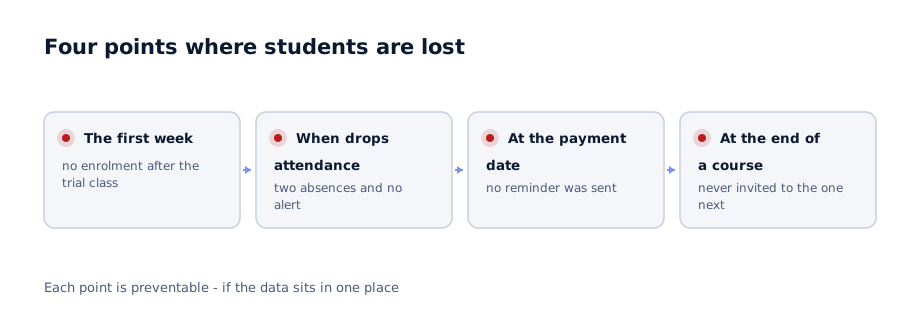
The first week. A prospective student attends a trial class but never enrols. Their contact details are recorded nowhere.
When attendance drops. Two missed classes trigger no alert. After a third, returning becomes psychologically harder.
At the payment date. A parent forgets, no reminder arrives, and the student stops coming.
At the end of a course. The course finishes and nobody invites them to the next one. They enrol somewhere else.
Each of the four is preventable, but only when the data sits in one place.
What the system covers
| Module | What it does |
|---|---|
| Groups and timetable | Courses, groups, room and teacher availability |
| Student records | Contacts, course history, documents |
| Attendance | Per class, marked by the teacher from a phone |
| Payments | Schedule, arrears, automatic reminders |
| Parent portal | Attendance, marks, payment status |
| Teacher records | Teaching hours and pay calculation |
| Reporting | Group fill rate, revenue, student retention |
The last line matters most, and it is usually missing. Without a retention figure it is impossible to tell whether the centre is growing or standing still.
The parent portal has the largest effect
This module delivers more than expected and it is usually left until last.
In the portal a parent sees which classes their child attended, which were missed, the payment status and any comment from the teacher.
That changes three things:
Fewer phone calls. An administrator answers dozens of "how is my child doing" questions a day. The portal absorbs most of that work.
Attendance improves. A parent learns about a missed class the same day rather than at month end.
Payments arrive on time. Reminders go out automatically and arrears fall.
Launch the portal first, not last. It produces the fastest visible result and improves the relationship with parents — which brings new students through recommendation.
Attendance: who marks it and how
This is an organisational question, not a technical one.
The teacher should mark it from a phone at the start of the class — a matter of seconds. If it stays in a paper register and the administrator enters it later, the data arrives late and loses its value.
Practical requirements:
- The teacher marks from a phone, not from a computer
- The group list fits one screen and the task completes in three steps
- Marking an absence sends a notification to the parent
- Two consecutive absences raise an alert for the administrator
- If the connection drops, the data is stored and synced afterwards
The fourth is the most valuable. That alert is what prevents a student from being lost — call in time and most of them come back.
Payments and arrears
Payment models vary: monthly, per course, per class, or a pass.
The system needs to handle all of them, but something else matters more — visibility of arrears.
In practice what happens is this: the student keeps attending, the payment slips, the administrator feels awkward chasing it, and three months later the amount is substantial.
The system closes that: a reminder goes out automatically three days before the due date, overdue accounts appear as a list for the administrator, and beyond a set threshold the student's status changes.
The reminder being automatic matters — it is impersonal and therefore causes no awkwardness.
How the rollout runs
01
Student records and groups
Existing data is migrated. It usually sits across several spreadsheets and in phone contacts.
02
Timetable and attendance
Teachers begin marking from a phone. Run in parallel with the register for a month.
03
Payments module
Payment schedule, arrears and automatic reminders.
04
Parent portal
Parents receive access. Call volume falls at this stage.
05
Reporting
Group fill rate, student retention, teacher workload.
The second step generates the most resistance. Teachers are used to a paper register and marking from a phone feels awkward at first. The interface must not exceed three steps, or they will go back to paper.
The most common mistake
Building the system for the administrator. You get polished reports and detailed screens, but an awkward interface for teachers. Attendance then gets entered by the administrator and the data arrives a day late. A day's delay pushes back the "two consecutive absences" alert and strips it of its value.
What to measure
| Metric | Why it matters |
|---|---|
| Student retention | What share reach the end of a course |
| Group fill rate | Empty seats are lost revenue |
| Total arrears | And the overdue share of them |
| Trial class to enrolment | Your conversion rate |
| Return after a course | What share continue to the next level |
The first and last are the key ones. Acquiring a new student costs several times more than keeping an existing one.
What it costs
$7,000-12,000On a ready system, 3-4 weeks
$28,000-35,000With your own specifics and a mobile app, 8-10 weeks
For most training centres the first option is enough — the processes are similar. A custom build is justified for online learning, video content or a distinctive assessment model.
In our experience over 10,000 students are active in education systems we have built.
In summary
A training centre system is not for managing a timetable. It is for not losing students.
Practical steps:
- Calculate what share of students completed your last three courses
- Bring attendance and payments into one place — the alert comes from there
- Test the teacher interface with a teacher, not with an administrator
- Launch the parent portal early
- Make the "two consecutive absences" alert mandatory
Let us review your training centre
In 30 minutes we identify where students are being lost, and you leave with an indicative timeline and budget.
Discuss your project
Shahbozbek Usmonov
ShahNur Software team sharing lessons from building and running real products.
About the teamRelated articles

ERP
How much does an ERP cost in the GCC
What drives ERP pricing, which ranges are realistic, and what to do when the budget does not stretch. A concrete breakdown by modules, integrations and.
August 25, 20266 min read
Read more
Automation
Attendance tracking: cards, fingerprints or face recognition
How the three methods differ, which suits which conditions and how each links to payroll. Working with staff and a practical rollout order.
September 12, 20267 min read
Read more
Industry
Inventory and POS system for a retail chain
Why stock never reconciles between branches, how to control receivables and which module to start with. A practical order for the rollout.
September 9, 20266 min read
Read moreHave a product idea? Let’s build it together.
Start a conversationOn this page